Showing posts with label Internet. Show all posts

Sunday, 13 July 2014

How To Create A Custom Search Engine For Your Website

                It is very important for any website have a search engine. if you have a website that has large or even small content, there are chances visitors to your site will want to search for information in your site, how do you expect them to find such information when there is no search engine in your website. Thanks to Google the search giant, they've made creating search engine for website easy without you doing any learning any programming language or write a line of code.
               
                     To create a search engine that will search your website for a query word or sentence, the use of Google Custom Search Engines (CSE) is by far the easiest, quickest and efficient way. Follow the steps below to learn how to Create A Custom Search Engine For Your Website.

Step 1]

Head over to google CSE and to do so you can search "google CSE" in Google and you can select the first option itself.


Step 2]

Now click on the create custom search engine button.


Step 3]

Enter the addresses of the sites you want your search engine to search.
You can enter entire sites like "computertweaks.in"  OR Specific pages on sites.

Fill the form specifying your website address(s) or URL(s), name and choosing your language then hitting the Create button.


Step 4]

Now after clicking on create button your Custom Search Engine is created.


Step 5]

Click on the Recieve code button to get the code to copy to your site that will add the custom search powered by Google.
You can use the code on your own webpage.


Step 6]

Copy the code.
Now you can paste it anywhere inside HTML where you want it to appear.
I am giving an example to add it to a blog at blogger.com

Go to your blog dashboard: select layout >> Add gadget


Choose HTML/Java Script


 Now Paste the copied code in the content box.
and Save it.


 Now you've successfully added a custom search engine to your blog.

There is a lot you can do now with your custom search engine like customizing the theme that may suite with your blog design, enabling monetization, disable or enable voice search and image search, changing layout and much more. Just navigation through left vertical menu bar while creating your search engine and you can easily do all from there. 

Wednesday, 26 March 2014

Use Mobile Phone Camera As A USB Webcam


We know that many social networking websites such as "Facebook" and "Google Plus" have Video Chatting feature, & we know that to start video chatting we need a Webcam. Sometimes, webcam is not available and we can't start video chat with our friends. But after reading this article you can use your mobile phone camera as USB or Bluetooth Webcam !!!

Yes! You Can Use Your Mobile Camera As A Web Camera For Facebook, Yahoo, Skype Or Any Other Video Chatting Supported Websites. We are going to use a software "Mobiola"


Requirements To Make Your Mobile Phone Camera As A USB Webcam -

1 - A Cell Phone with Camera
2 - USB Data Cable or Bluetooth Dongle to create connectivity between your Computer and your Cell Phone.
3 - And A Computer or Laptop.


You can use this trick with any kind of mobile phone such as NokiaiPhone,BlackberryWindows Mobile Phones, Symbian S60Android


First Of All, Trick For Nokia Java, Symbian S60, iPhone, Blackberry And Windows Mobile Phones - 

Step 1 - Go to this link http://mobiola.com/mobiola-web-camera and click on Download and select your mobile phone to start downloading the app.

Step 2 - Those who are using Java phones like Samsung, Sony Ericsson, Nokia 5300 ,Nokia 3500 etc. download this application from this link - http://mobiola-webcam.en.softonic.com/java 

Step 3 - Mobiola consists 2 parts. one is a Client Part and other one is a Server Part.

Step 4 - Install Server Part on your PC (.exe file) and install Client Part on your Mobile Phone (ie. .jar and .sis etc). 

Step 5 - Run Mobiola Webcam on your Computer. 

Step 6 - Run Mobiola Webcam on your Mobile Phone.

Step 7 - Connect your Mobile Phone to your PC by using a USB Data Cable or Bluetooth Dongle.

Step 8 - Now in your Cell Phone, go to Mobiola app and then go to Options, then Connect.

Step 9 - After that, select Bluetooth or USB (Whatever is connected between your Mobile Phone and PC) to create a connection...

Step 10 - After authentication all work is done.


If You Are Using An Android Phone Then Follow These Steps To Turn Your Mobile Phone As A Webcam -


Step 1 - Go to Android Market or Google Play Store on your Android Phone and search for A Application Named "USB Webcam".

Step 2 - Download and install that application on your Android Phone and turn on USB debugging by going to Settings--> Application--> Development--> USB Debugging. 

Step 3 - If you are using Windows on your Computer then download Server for USB webcam from here - http://www.placaware.com/?page_id=6

Step 4 - If you are using linux on your computer, then download Server from Here - http://www.placaware.com/?page_id=116 

Step 5 - Install Server on your Computer. 

Step 6 - Connect your Cell Phone via USB Cable to your Computer. 

Step 7 - After that, double click to open Server from your PC, and open Client app from your Cell Phone and Create A Connection. 


That's all... Now you can use your mobile phone camera as USB Webcam!

Sunday, 9 February 2014

Finding Ip Address Of A Website Using Command Prompt Or CMD

In this tutorial i will teach you to find Ip Address of any website using Command Prompt or in short CMD. Using IP Address you can find location of the website server and do more stuff. I will demostrate this tutorial with Google but you can use this method to find IP Address of any website like twitter, facebook etc. So lets get started.

How to find IP ?

1. Go to Start > Type CMD and press Enter.
2. Now write Ping followed by website URL whose IP you want to find.

finding ip adddress of website
3. It will take less then a second and come up with the results as shown below.

finding ip adddress of website

In  my next post i will show you another easy way to find website IP Address and teach you to use this IP to find its location.

What Is Keylogger And How To Be Safe From Keyloggers?

 In this tutorial i am going to talk about the most use piece of software besides from RAT by hackers to observe your activities on your computer and that is keyloggerskeylogger is a software or hardware device which monitors each and every key typed by you on your keyboard. I am going to talk about different types of keylogger and how to be safe from keyloggers. So lets learn somthing about keyloggers.

 1. What is keylogger ?

You might have heard about keyloggers but really dont know what they are reading this article will clear your mind. A keylogger also know as keystroke logger is software or hardware device which monitors each and every key typed by you on your keyboard. You can not identify the presence of keylogger on your computer since it runs in background and also it is not listed in task manager or control panel. It can be used by parents to keep eye on their childrens or company owner to spy on their employes.

2. How it can harm you ?

In this section i will talk about how keylogger can harm you in different ways for example It can be used by your enemy or friend to get sensitive information such as your username and password, Bank credit card details, or any other activities you do on your computer.
  • Example: You login in to your Facebook account from a computer in which keylogger is install then your username and password will be captured.

3. Types of  keyloggers 

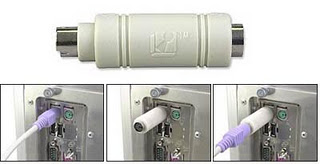
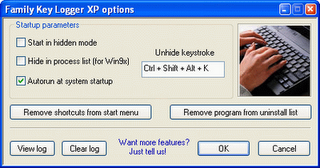
There are two types of keylogger hardware keylogger and software keylogger. Software keylogger is install in your computer where as a Hardware keylogger is attached to your keyboard. Looking at below images will clear your mind.

                              HARDWARE KEYLOGGER                                  
hardware keyloggers 
 SOFTWARE KEYLOGGER
 software keyloggers


 4. How to Protect yourself from keyloggers ?

Keylogger  can be used by your enemy  to get sensitive information such as your Bank credit card details, or password of any social networking sites etc. In order to be safe keep following points in your mind.
  • Never use your online banking from cyber cafe. If you want to use then you can try this method. open notepad and type anything Then copy and paste each word that comes in your username or password.
  • You can even use above method to protect your facebook profile, yahoo or gmail id.
  • When you enter cyber cafe make sure that no hardware device is attached to keyboard wire. Its look something similar to above image.

Hacking Someone's Facebook Password Using Some Software Or Website? No Sir You Can't!

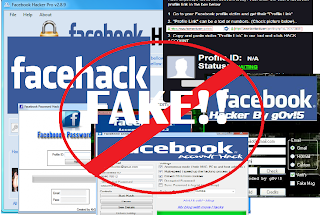
facebook hacking
Do you know there are over thousands of websites and software that claim to hack Facebook password of any account? They'd ask you the victim's profile ID, maybe your credentials and some money too and will reportedly tell you the password which, to be honest, never works. Ever wonder why? Let me tell you why, they're FAKE! They're a scam which tricks you somehow in losing your money or your own Facebook account. Just give it a thought, why would Zuckerberg and his team spend Billions of Dollars on Facebook if one could hack it in less than a minute? Today, we'll take a look at this topic in detail with some example websites and software and get answers to some common related questions.

Back in 2005, I came across a mechanism that reportedly hacked Yahoo mail password for a user using some simple tricks. It didn't work for me for obvious reasons but I didn't stop believing the possibility until I grew up to realize how helpless I am here. One of the major concerns of large organizations like Facebook and Yahoo is security because of the super sensitive information about people they have. Several hundred million dollars are spend yearly by these organizations to ensure security and then there's these websites that claim to undo all that protection in less than a minute.

The Facebook password cracking Websites and Software

Let's start with some examples here. I googled the subject and picked the top results without order. Didn't care to search harder because there are thousands such and I know that all are FAKE.

So let's look at this GETFBHACK.com.
hacking facebook password
Their FREE Facebook hacker program is said to be capable of cracking the password of any Facebook user within a day. Sounds cool, I could try it out, but my Norton Antivirus rejected the file straight away.

I also picked up another one. This Hack-Fbook-Password asks me to enter the profile ID of a user and it will crack the password. I said Okay and began the process.
facebook hacking
It ran certain algorithms to determine the password and finally landed me on a page that said I could DOWNLOAD the password IF I fill an online survey first. Those of you who've been redirected to surveys would know they don't work and are put just so to get traffic and earn money.

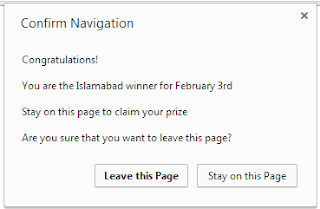
I said maybe I should leave the website now but hey, they gave me a prize!
hacking facebook

So I just became the luckiest person in my city just like that!

Now tell me, how can a sane person believe in all this?

The truth!

Let me get this straight to you, these websites do nothing at all just waste your time and are never able to do the job. In fact, downloaded programs just make the situation worse when you run them. I had my Norton Antivirus to guard me otherwise I could be in severe danger currently.

These software are mostly keyloggers and tracking programs that record your keystrokes and action and steal personal information from your computer in the background and send it to their master servers. So ultimately a hacker wannabe gets hacked, how ironic!

From now on in the post, I'll be using the word 'Hacker' for these websites and software since you're no more in the position to be called that.

Why do these 'Hackers' do all that?

facebook hack
Setting up websites, maintaining them and developing software is not an easy task. It requires some money. So why do these 'hackers' do all the hassle? It's because they get equivalent or more money in return. They can extract your credit card details and other banking info from your system and use it for their advantage. They can hack your account and use it for wrong purposes. Give me one reason why one wouldn't steal money and hack accounts for no loss.

Why people fall in their webs?

facebook hack
Why do people try to use such unreal hacking procedures? It's because it's unreal to me, it's unreal to you but not to those who are not much familiar with the working of a software. They get in the web of these hackers and eventually get screwed up pretty bad without consent.

The websites give guarantees and also portray their 'imaginary' happy customers so as to trick a reader. Such tactics are simple but really powerful and serves to their advantage in most cases. This is also why there are thousands of such websites available.

So is Facebook account an 'unbreakable fortress'?

facebook hacking
Well, NO. Facebook accounts can be hacked. No online service is foolproof and that is because of the flaws and bugs in their software. There are several ACTUAL hackers in the world who can analyse a website's security and use that against it thus making hacking a reality.

But I'm 100% sure none of them uses these scam and fake websites that claim to do the impossible. You can check out our hacking section to know more.

I'll end the 'lesson' with an idiom, "look before you leap". Focus, think and then follow. In case of any queries or confusions head over to the comments section. Cheers :)

Saturday, 25 January 2014

Gmail Hacker | Fake Tool to Hack Gmail Accounts Read more

Hey friends, today i am going to disclose some irony stuff that Hackers nowadays using to make people fool these days. Hackers are spreading a software tool named as Gmail Hacker v1.0 on the internet with title " Hack Gmail Accounts using Gmail Hacker" or "Gmail Hacker : A superb Gmail Account Hacking tool". But beware of such articles because its nothing more than a smart keylogger which is actually intended to hack users credentials that user gonna use to hack somebody's gmail account. Let us discuss the process in detail:
First of all frankly speaking, Gmail Hacker is a hacking tool( or i better call it social engineering hacking tool) which can be used in either way like Hacking someone's Gmail account and at same time loosing your Gmail Account( if not handled with extreme care). So friends which process you all wanna learn first. Hacking one or getting Hacked one.. or both at same time going step by step :P.
For Having a trail of Gmail Hacker tool you gonna need below stuff:
Now lets go step by step for the Hacking procedure:
Gmail Hacker for Hacking Gmail Accounts:
Step 1 - Extract the arhive named Gmail.rar on your computer, Once you have extracted you will see the following file:
Builder.exe
Step 2 - On opening Gmail hacker builder.exe you will see the following:
4115378636 7a99b4ff35 %281%29
Step 3 - Next you need to enter your gmail address where you would receive logs. However I would recommend you to create a fake email address and use it for receiving logs. 
Step 4 - Once you have entered your credentials, click on the build button. 
Step 5 - A file named gmailhacker.exe would be created, On executing the file, the victim will see the following: 
4115378760 a2e79f5773
Now you need to apply your social engineering skills in order to make the victim enter his/her credentials on to the software. The simplest way of accomplishing this is to tell the victim that the application Gmailhacker.exe is itself a gmail hacking software, You just need to the victim's username, your own gmail ID and your own gmail password, where you would receive victims passwords and click "Hack Them".
Step 6 - Once the victim clicks on the "Hack Them" button, his own gmail credentials that he entered would be sent to you on the email you typed while configuring the software. 
Well, here is an interesting part, when the victim will click on the button "Hack them", he will receive the following error, making him thinking that their is a problem with the software:
4115386436 1acebf90b6
Now i hope you all understood which part you need to provide credentials and which part you need to provide the fake account credentials that you have recently created.
Irony Part : The file that is being generated by builder.exe i.e. Gmail Hacker.exe is a advance type of remote keylogger which will sent the credentials you have entered into the Gmail Hacker option menu to the hacker who has build the Gmail Hacker.exe file. So important part never put your original account credential in any of such tools which gurantees that they can hack email accounts or facebook accounts because all are simply fake. They are just cool social engineering stuff which is used to make newbie Hackers or users fool to hacker their Gmail accounts.

How to Track Lost Android Phone and Tablet

Your Android gadgets are the most important things in your life. It contains all your important contacts and information. If you lose your equipment, you will be losing all those sweet memories with the photos and video. But there is some good news to android phone/tablet users, you can now easily find or at least know where your missing phone is with or without using android application.
Let’s first look at the way of finding your lost phone which doesn’t contain any app installed on it.

Use the IMEI Number

Every android phone carries a unique IMEI number (International Mobile Equipment Identity Number). It will be printed at the back of your device. If you are unable to find the number, you have to launch your phone app and dial the number *#06#. This will give you the IMEI number of your phone. Store this number in a safe place so that it helps you in locating your phone when it is lost.
When you file a complaint, this number has to be added in the report. Your service provider uses this number to track your phone and tell you where it is. No matter if the person using the phone is using a different SIM card or has switched off the phone. Once the device is traced, you can request your service provider to block it from using.
This is one of the easy ways of locating your lost Android phone or tablet.

Plan B

Another way of tracking your lost Android gdget in no time is through Plan B app. This app does not require you to install any recovery software previously but still helps in finding your lost phone. All you need to do is log on to your Google play account. Lookout mobile security offers free software called Plan B. Download the software from play store to your phone. This will be possible only if your phone is within the Internet coverage area. Wait for some time and then send the keyword “locate” without the quotes through SMS to your phone. And a map showing where your equipment is will be sent to your Gmail account. This app is very much useful in situations where you don’t have IMEI number.
If you have installed and configured any of these below android software previously, there is good chance of finding it.
You can log on to Google Play store > My Android Apps, on your computer and check if you have installed any of the following apps previously.

Lookout Security and Antivirus

Lookout is the best android app for security and antivirus. So far, it has received millions of downloads. Just recall if you have installed this on your phone.
If you have activated the option “Missing Device” in this app, it is easy to find your device. If you have also enabled “Signal Flare” option, you can trace the last known location of your android device. This is helpful in case your phone battery is dead or tablet is switched off.
Now sign in Lookout to locate your device. The map shows the location of your phone. If you are at a short distance from the tablet, you can choose Scream option to make a loud noise to find it.

Android Device Manager

Google has recently released a new locator feature for Android gadgets called Android Device manager, which helps its users locate their lost or stolen phones and tablets. It functions in the same way as Lookout and Samsung’s “Find My Mobile”. Here’s how to use Android Device Manager.
Go to the Google Settings app, then select Android device manager. By default the locator feature is activated but to activate remove data wipe, select the box next to “Allow remote factory reset”, then select “activate”.
To use this feature, open the site https://www.google.com/android/devicemanager and sign in to your Google account. You may be prompted for permission to allow Android Device Manager to use location data. Select the Accept tab to continue.
Now you will be provided with a map that shows the location of your device along with other details such as the name of the place, when it was last used and more. The location data doesn’t help you if your phone is misplaced somewhere in your home. Instead of making a call to your phone using other’s phone, you can call your phone directly from Android Device Manager. This will make your device to ring with high volume for 5 minutes, even if it’s in silent or vibrate mode.
One feature that is missing in Android Device Manager is remote locking, which can be useful in preventing a stranger from accessing your data, while you’re tracking its location.
Apart from these, there are other apps such as Android Lost, Where do My Droid and GadgetTrak that help you in finding your lost Android phone/Tablet.

Facebook Hacks

Want to learn cool and useful facebook hacks? Here is list of top 24 facebook hacks , that will teach you a lot new things about facebook!

1 .Facebook Chat Hack

To add pictures during chat session, just Type Unique id or Username between [[ ]] .
[[unique id or Username ]]
for example : [[1758955254]]

To find your facebook ID , go to profile page and look at url , you’ll see id=xxxxxxxxxxxxxx, for example my facebook id is 1758955254 .

2. Facebook Chat Emotions:


3. Who deleted me on Facebook?

Ever wanted to know “Who deleted me on Facebook?” . Use this FACEBOOK APP to find out.

4. Create A Video With Your Facebook Photos

pixable.com is website that allows you to create video with your facebook photos.

5. Facebook Hack To Publish Empty Status

Just enter the following code and hit enter
@[2:2: ]

Empty facebook status looks as :

6. How To Activate Facebook Timeline

1) Click Here
2) Then click Get Timeline

3) Click on Publish Now button on the top , that is it !


7. How To Remove/Disable Facebook Timeline

How To Remove Facebook Timeline For Firefox:


How To Remove Facebook Timeline For Google Chrome:


8. How To Stop Receiving Facebook Notifications via Email

To stop receiving facebook notifications via email , go to Account Settings

Then click on Notifications

you’ll see as below

You can see number of notifications under each category ,uncheck all according too you need ,you can uncheck all or you can keep checked what you want

9. English Pirate Hack

We’ll start with simple facebook hack. English pirate offers some pretty hilarious pirate variations.
Go to Account Settings

Language -> Edit

Choose ENglish (pirate) and Save Changes

It looks as :

10. Write Upside Down Facebook Status

You’ve probably noticed a few people posting upside down status updates . If you want to write upside down status, you can use free online tool fliptext.org

11. How To Download All Pictures From A Facebook Profile At Once

There are a lot tools that allows you to download all photos from your profile. Here I’ll mention few
1)Picknzip
2)Photo Grabber
3) Album Copier

12. How to Undo Facebook Changes

You can download script that undoes some of the newer presentational layout changes for people who are afraid of change.
before:

after:


DOWNLOAD SCRIPT

13. Profile Photo Hack

With the Facebook’s new profile page you can divide your profile photo into 6 parts(1 profile pic and a photo strip of 5 recent photos in which you were tagged). There are some applications which allows you to write some funky text in the photo strip but dividing your own picture will be much cooler. Look at picture below to know what you can do with this trick.

How to do it
1) You need a photo of at least 692 pixels wide and 540 pixels high and a photo editor. I did it with Photoshop CS3.
2)To get your profile pic make a crop that’s 180 pixels wide and 540 pixels high.
Note: Start the crop from the left most corner.
3)Now to get the photo strip, crop a 492 X 68 pixels strip. Start the crop from 20 pixels below from right-top corner of the image.
Note: Google’s top searches say it should be 20 pixels but I took around 30 pixels to get it right.
4)Now, you have to divide the strip into 5 parts. The photos in the strips of Facebook have a gap of 2 pixels. 492 – 8 (4 * 2 pixels) = 484 and 484 / 5 = 96.8. So, you have to cut 5 photos of 96.8 X 68 leaving a gap of 2 pixels. As, Photoshop didn’t allowed me to crop the image in points I took it as 97 X 68 and the widened the last image as it was 1(.2 px * 5) pixels short.
5)The difficult part has been completed till now. Just upload all the 6 images on Facebook. First, set your profile pic which we made in the 2nd step.
6)Now, to make the strip, you have to tag yourself in the reverse order. This means, the photo which will be in the right most corner of the strip should be tagged first and the left most photo should be tagged last.
7) You’re done, just tell your friends to visit your profile.

14.How To Block Certain People From Chat

Go to options -> Advanced Settings

Under All your friends see you except… choose friend that you don’t want to see you when you’re online.

15. How To Create Fake Facebook Conversations

1) Go to fakeconvos.com
2) Click on create a new convo

3)Type name of commenter, select your upload picture, type what ever you want to say and click on add stream
you can add as many people to the stream as you want, you can even login to the facebook and add your actual friends to the stream

4)Type descriptive title and save it

5)Now you can right click and save your picture and send it to your friend

16. How To Hide Your Profile On Facebook

Add caption
1)Login to your facebook account and click on Account-> Account Settings

2) Locate the sections Privacy under account settings and click Manage

3) Under Privacy Settings click on Search

4)If you don’t want your profile to appear in search engines , then uncheck Public Search Results

If you want that only your Facebook friends can see your profile and other information about you, ten choose option friends only

17. How To Improve The Probability Of Getting A Like On Facebook Page

1) Go to wildfireapp.com and install iframe app
2) Allow Wildfire’s iFrames for Pages

3)Click on Add Wildfire’s iFrames for Pages

4)Register your app by filling in your personal information and clicking “Submit“.

5) You can upload image or put html code for Fan and Non-fan visitors.

If you know how to use html and css you can make very cool facebook page, for example:

Html Code:
<div style=”background-color: #eee; width: 490px; padding:15px;”>
<a href=”http://www.wildfireapp.com” target=”_parent”><img src=”https://s3.amazonaws.com/wildfireapp/wildfire/iframe_hero.jpg?2” style=”border: none;” height=”565″ width=”490″ /></a>
<h1 style=”color: #770495″>Learn about Wildfire’s iFrame App <a href=”http://wildfireapp.zendesk.com/entries/20003303-acceptable-html-and…” target=”_parent”>here</a>.</h1>
<p>Sed ut perspiciatis unde omnis iste natus error sit voluptatem accusantium doloremque laudantium, totam rem aperiam, eaque ipsa quae ab illo inventore veritatis et quasi architecto beatae.</p>
<p>Vitae dicta sunt explicabo. Nemo enim ipsam voluptatem quia voluptas sit aspernatur aut odit aut fugit, sed quia consequuntur magni dolores eos qui ratione voluptatem sequi nesciunt. Neque porro quisquam est, qui dolorem ipsum quia dolor sit amet, consectetur, adipisci velit, sed quia non numquam.</p>
<h2>You Wont Believe These Deals</h2>
<img src=”https://s3.amazonaws.com/wildfireapp/wildfire/iframe_secondary.jpg?2” width=”124″ height=”124″ style=”float: left; margin:0 15px 15px 0;” />
<p>Ius modi tempora incidunt ut labore et dolore magnam aliquam quaerat voluptatem. Ut enim ad minima veniam, quis nostrum exercitationem ullam corporis suscipit laboriosam, nisi ut aliquid ex ea commodi consequatur? Quis autem vel eum iure reprehenderit qui in <a href=”http://www.wildfireapp.com” target=”_parent”>ea volupta</a> te velit esse quam. </p>
<p>Nihil molestiae consequatur, vel illum qui dolorem eum fugiat quo voluptas nulla pariatur? Ius modi tempora incidunt ut labore et dolore magnam aliquam quaerat voluptatem. Ut enim ad minima veniam, quis nostrum exercitationem ullam corporis suscipit laboriosam, nisi ut aliquid ex ea commodi consequatur? Quis autem vel eum iure reprehenderit qui in ea voluptate velit esse quam nihil molestiae consequatur, vel illum qui dolorem eum fugiat quo voluptas nulla pariatur?</p>
</div>

18. How To Be Safe on Facebook

To secure your account and browsing within Facebook you should use “Secure browsing (https)” that will prevent your account from session hacking.
Go to Account Settings -> Security and choose secure browsing as shown on image below

19. Tag People in Your Status Updates

When you are writing a status update and want to add a friend’s name to something you are posting, just include the “@” symbol beforehand.
As you type the name of what you would like to reference, a drop-down menu will appear that allows you to choose from your list of friends and other connections, including groups, events, applications and Pages.

20. Hide Status Updates From Certain People

Using this facebook hack , you can control who can read your status updates with Facebook’s privacy settings.
Click on Public -> Custom , as shown on image

Under Hide this from , type people from which you want to hide your status update.

21. How To Search Facebook Like A Pro

Facebook search has a lot of advanced options , for example , if you type name: John Marsh status:married , you’ll filter your results down to only people who are married .

A complete list of search tips for Facebook can be found here.

22. How To Update Facebook Status From Google Account

You can use google gadget to update facebook status from google acc, Facebook for iGoogle

23. Post your Tweets to Facebook

Connect your Twitter account with Facebook to share Tweets with your Facebook friends.
It only takes a minute. Use Twitter App For facebook .

24. How To Increase The Size Of Wall Post

Using Greasemonkey script you can make the Facebook wallpost textbox more bearable by lengthening it and widening ot to the width of an actual post.

25.

Facebook Chat code

Facebook is one of the most grown and growing social networks in the world. For the same reason, Facebook hacks and tricks are becoming more popular. Have you ever sent coloured text in your chat on facebook?Most probably the answer will be ‘no’.So check this out!
Wanna try this?
facebook chat hack
[[107015582669715]] = A
[[116067591741123]] = B
[[115602405121532]] = C
[[112542438763744]] = D
[[115430438474268]] = E
[[109225112442557]] = F
[[111532845537326]] = G
[[111356865552629]] = H
[[109294689102123]] = I
[[126362660720793]] = J
[[116651741681944]] = K
[[115807951764667]] = L
[[106596672714242]] = M
[[108634132504932]] = N
[[116564658357124]] = O
[[111669128857397]] = P
[[107061805996548]] = Q
[[106699962703083]] = R
[[115927268419031]] = S
[[112669162092780]] = T
[[108983579135532]] = U
[[107023745999320]] = V
[[106678406038354]] = W
[[116740548336581]] = X
[[112416755444217]] = Y
[[165724910215]] = Z
And the most important part… How to use it?
Just copy the code of the alphabets you need and insert them in chat with a space between each codes. Now there you go with cool coloured text in chat!
Example : Here is the code for HELLO
[[111356865552629]].[[115430438474268]].[[115807951764667]] [[115807951764667]] [[116564658357124]]